How to reopen a closed tab on iPhone (and why you should save the link next time)
Published · 5 min read
To reopen a closed tab in Safari on iPhone, tap the Tabs button, then touch and hold the plus (New Tab) button. A Recently Closed Tabs list opens, and tapping a page in it reopens it in a new tab.
That list is short and it is not a promise: some closed tabs never show up in it. This guide covers the ways to get a page back, when it cannot be recovered, and how to avoid the problem. Menu names can differ slightly between iOS versions.
How do I reopen a tab I just closed in Safari?
- 1In Safari, tap the Tabs button (two overlapping squares) to open the tab view.
- 2Touch and hold the plus (New Tab) button until a list appears.
- 3Tap the page you want in the Recently Closed Tabs list. It opens in a new tab.
The list holds only tabs you closed recently, and it is per device. If the page is not there, try the next section.
How do I find a page in my Safari history?
- 1Tap the Bookmarks button (an open book) in Safari.
- 2Choose the History tab (the clock icon).
- 3Scroll, or type a word from the page title or address into the search field, then tap the page to open it.
History lists pages you visited, not tabs, so it does not remember which pages were open together. With Safari turned on in iCloud, history from your other Apple devices appears here too.
Why can’t I get my closed tab back?
- It was a Private tab. Private Browsing does not keep history, and closed private tabs are not offered back.
- You cleared history. Settings → Safari → Clear History and Website Data removes the list of visited pages.
- Safari closed it for you. Settings → Safari → Close Tabs can close tabs automatically after a day, a week or a month.
- It was a long time ago. Recently Closed Tabs is meant for recent mistakes, not for last month’s article.
- You do not remember the site. History search needs a word from the title or address; scrolling helps when you remember roughly when you visited.
When none of this works, the page is not lost: the same article is usually reachable by searching for its title or by going back through where you found it, such as a chat, a feed or a newsletter.
How do I get back to a page from another device?
With Safari turned on in iCloud and the same Apple Account on both devices, open the tab view on the iPhone and scroll down: tabs open on your other devices are listed there. This only covers tabs that are still open on the other device. Pages already closed there are found in History.
How do I stop losing tabs in the first place?
Tabs are a bad place to keep things. They are easy to close by accident, and they pile up until you clear them in one go. A page you want to see again belongs in a list, not in a tab. See how to save open Safari tabs and close them for Tab Groups and bookmarks, and how to find a saved link on iPhone for searching what you already kept.
- Before you close a page you may need again, tap Share and save the link somewhere you will search later.
- Turn off automatic tab closing, or pick a longer period, if pages keep vanishing.
- Use a normal tab, not a Private one, for anything you may want back.
How does Linkeeper help?
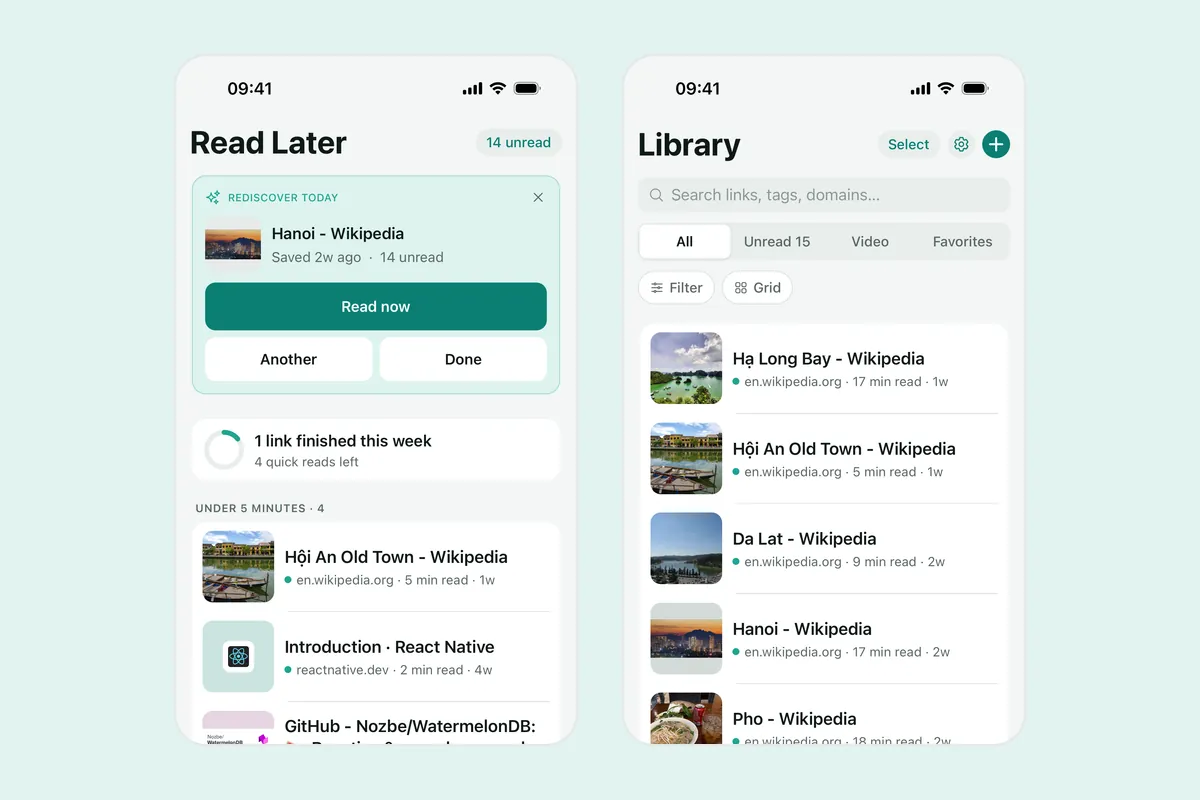
Linkeeper is an iPhone and iPad app that saves links from any app in one tap and keeps them in one organized, searchable library. In Safari, tap Share and choose Linkeeper; the link is saved without opening the app, so you can close the tab straight away. If it is not in the row, add it to the share sheet.
- The title, description and thumbnail are filled in, so a saved page is easy to recognise later.
- Search runs on your iPhone and works offline.
- Tags and collections group links, and unread, favorites and archive keep a reading queue.
- No account is needed. Signing in is optional and only used to sync between devices.
Honest limits: Linkeeper does not bring back tabs you already closed, and it saves one link at a time. It helps for the next page, not the one you lost today.
Frequently asked questions
- How do I reopen a closed tab on iPhone?
- In Safari, tap the Tabs button, then touch and hold the plus button to open Recently Closed Tabs, and tap the page you want. If it is not there, look in History (Bookmarks button, then the clock icon).
- Where is Safari’s Recently Closed Tabs list?
- Open the tab view with the Tabs button and touch and hold the plus (New Tab) button. The list is per device and only shows recently closed tabs.
- Can I reopen a closed private tab on iPhone?
- Generally no. Private Browsing does not save history, and closed private tabs are not offered back, so save the link before you close one if you want to return to it.
- Why did my Safari tabs disappear on iPhone?
- Common reasons are closing them by accident, clearing history and website data, or the Close Tabs setting in Settings → Safari closing old tabs after a day, a week or a month.
- Does Linkeeper need an account?
- No. Links, notes, tags and collections are stored on your iPhone first. Signing in with Apple or Google is optional and only used to sync your library between devices.