How to save a link from Chrome on iPhone to read later
Published · 5 min read
To save a link from Chrome on iPhone, open the page, tap the menu button and choose Add to Reading List (to read it later) or Add to Bookmarks (to keep it for good). Chrome also has a Share option that hands the link to the iOS share sheet, so you can send it to any app that saves links.
These are three different places, and they do not mix: Chrome’s bookmarks and Reading List live inside Chrome, separate from Safari’s. This guide shows each method, where to find the page again, and what to do if you use both browsers. Menu names and positions can differ between Chrome and iOS versions.
How do I add a page to the Reading List in Chrome on iPhone?
- 1Open the page in Chrome.
- 2Tap the menu button (the three dots) and choose Add to Reading List. In some versions it is under Share, as Read Later.
- 3To open it again, tap the menu button and choose Reading List.
Per Google’s help page, a Reading List entry is meant for reading later and can also be read offline, which a plain bookmark is not. Pages you have read move to a separate list, so the unread list stays short.
How do I bookmark a page in Chrome on iPhone?
- 1Open the page in Chrome.
- 2Tap the menu button and choose Add to Bookmarks (or Bookmark, depending on the version).
- 3To find it again, tap the menu button, choose Bookmarks and open the folder it went into.
A bookmark is a pointer to the address, so it needs a connection to open. Use bookmarks for pages you will come back to over time, and the Reading List for pages you plan to read once.
How do I share a link from Chrome to another app?
Tap the menu button and choose Share, or use the share icon next to the address bar if your version shows one. That opens the standard iOS share sheet, the same panel you get in Safari. Tap an app’s icon to send the link to it, or Copy to copy the address.
If an app you installed is missing from the row, scroll to the end, tap More and add it, as described in how to add an app to the iPhone share sheet.
Why can’t I find my Chrome bookmarks in Safari?
Because they are different lists. Safari keeps its own bookmarks and Reading List, and Chrome keeps its own. Saving in one does not add to the other, and neither is shared with other apps on your phone. If you want one list, you have to choose one place to save to, or bring the links together by hand. The differences inside Safari are covered in Bookmarks vs Favorites vs Reading List.
How do I keep links from Chrome and other apps in one place?
Linkeeper is an iPhone and iPad app that saves links from any app in one tap and keeps them in one organized, searchable library to read later. It does not care which browser the link came from, so it can be the one list for Chrome, Safari and social apps.
- 1In Chrome, tap the menu button, then Share.
- 2Choose Linkeeper in the share sheet. The app does not open; a small card confirms the save, or says the link is already saved.
- 3Open Linkeeper when you want to read or search. Shared links are added to the library the next time the app is open.
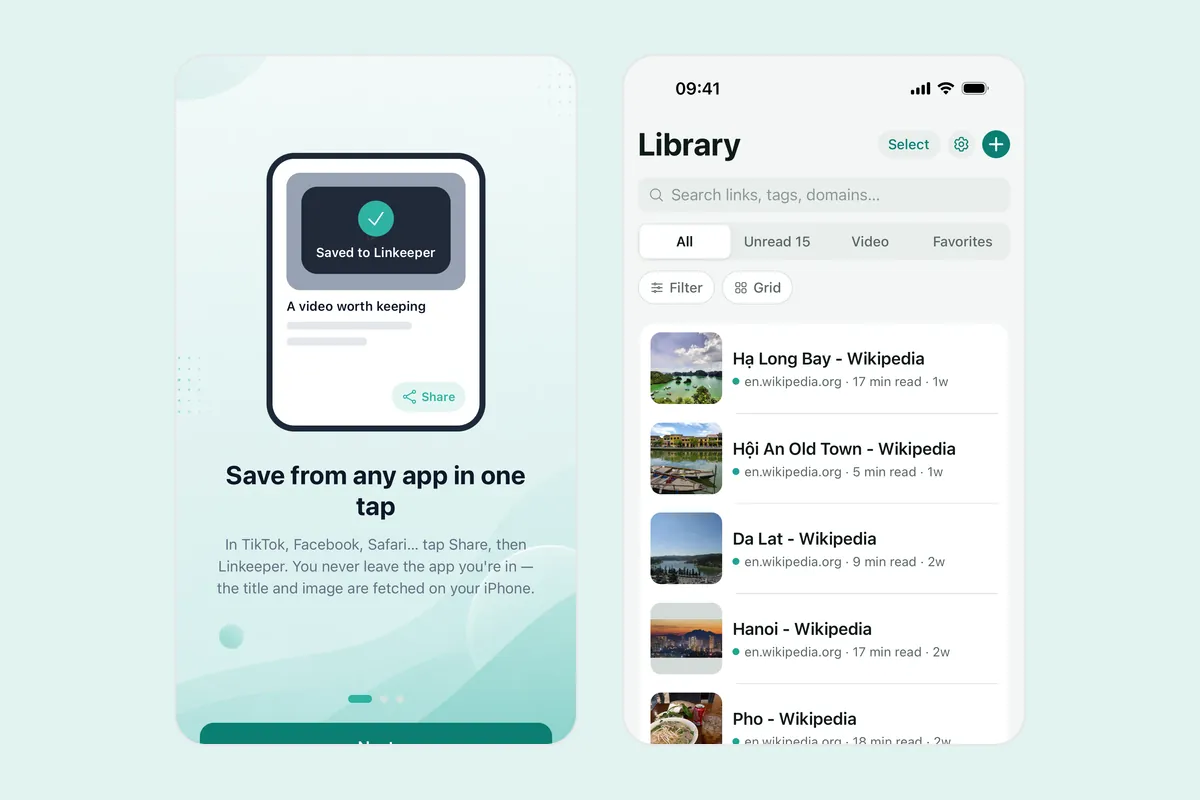
Linkeeper tries to fetch the title and a thumbnail for each link, and you can add tags or put links in collections. Saved links are stored on your device first, so searching works without a connection; the page itself still needs one to open. An account is optional and only needed for syncing between devices.
Frequently asked questions
- How do I save a page to read later in Chrome on iPhone?
- Open the page, tap the menu button and choose Add to Reading List. Open the Reading List from the same menu to find it again.
- Does Chrome on iPhone have a Reading List?
- Yes. Google’s help page describes it as a way to save pages to read later or offline. The menu wording can differ between versions.
- Where are my Chrome bookmarks on iPhone?
- Tap the menu button in Chrome and choose Bookmarks. They are separate from Safari’s bookmarks.
- Can I use the iPhone share sheet from Chrome?
- Yes. Choose Share from Chrome’s menu to open the iOS share sheet and send the link to an app that saves links, or copy it.
- Can Linkeeper save links from Chrome?
- Yes, through the share sheet: tap Share in Chrome and choose Linkeeper. If Linkeeper is not in the row, add it under More.